


ITS is expanding our Microsoft Copilot service to include optional AI integration within all of your Microsoft Office 365 applications. Through this paid license, Microsoft 365 Copilot is embedded into tools like Outlook, Excel, Teams, Word, and PowerPoint, allowing you to generate content, summarize information, and automate tasks – without switching applications.
Microsoft Copilot Chat vs. Microsoft 365 Copilot
ITS is now offering two tiers of Copilot service:
- Microsoft Copilot Chat (Free): This is what is currently available to all faculty, staff, and students in Microsoft Office 365. This AI chatbot lets you ask questions and get immediate answers, but is not available in your other Microsoft applications. Copilot Chat will remain free to the WCM community.
- Microsoft 365 Copilot (Paid): Copilot is embedded in your Microsoft applications, becoming a more powerful tool to create presentations, summarize meetings, analyze data, and more. This add-on service is ideal for those seeking to integrate Copilot with organizational data and create enterprise workflows.
Visit its.weill.cornell.edu/copilot to see how these services compare and review guides on using Microsoft 365 Copilot.
Cost to upgrade Copilot license
A Microsoft 365 Copilot license costs $231 per user annually.
How to request Microsoft 365 Copilot
Contact your manager or department administrator to submit a Microsoft 365 Copilot license request on your behalf (access to the form is limited to fund owners*). Due to high demand, licenses will be fulfilled by the first week of August.
*Note for fund owners: At this time, we are unable to process bulk orders for paid Copilot licenses. Please submit a request for each staff member who requires access.
A note about using Copilot at WCM
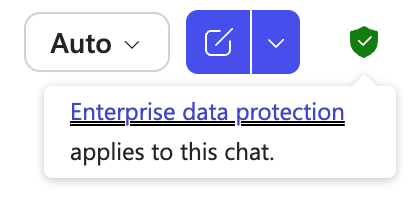
As with any AI tool, we caution you that responses from Copilot may not always be accurate, so please double check information and be aware of biases that can be generated. When using Copilot Chat, ensure you are logged in with your CWID and password to use our secured version that allows you to input institutional data (look for the green shield icon in the upper-right corner of your screen):
If you have any questions about Copilot, please contact copilot-feedback@med.cornell.edu or visit our AI page.