

ITS has identified a new phishing attempt targeting WCM users. An external, unauthorized account has been impersonating WCM faculty and staff to gain personal information from other employees. Here’s one example of what the phishing attempt looks like:
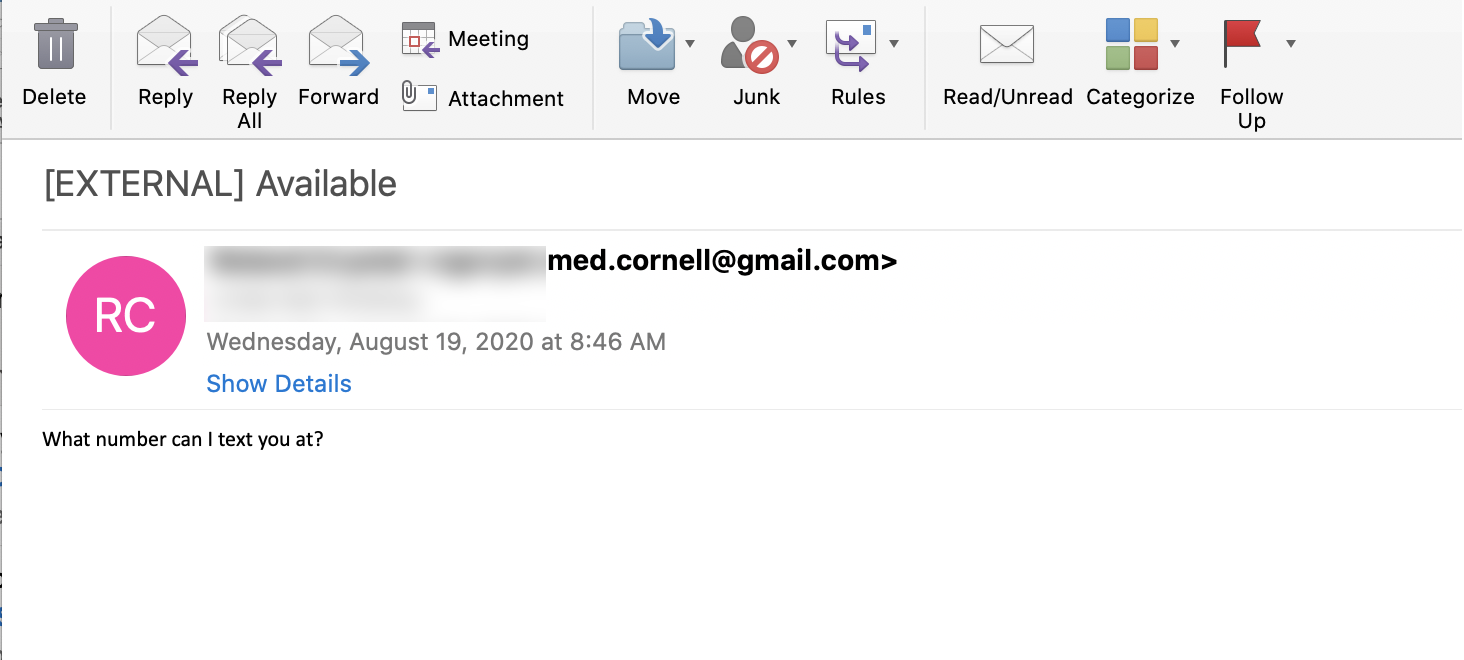
If you receive a similar message, please report it to ITS using Phish Alarm to confirm its authenticity.
How will this affect you?
This message is an attempt by an unauthorized party to solicit personal information and money from people by disguising their sender information as a WCM account, also known as “spoofing.” While ITS is working to block these spoofed email addresses from reaching any other WCM accounts, it is possible that messages from new spoofed accounts will still be delivered.
What do you need to do?
Messages of this type are malicious phishing attacks. If you receive a message similar to the one above, confirm its authenticity by using the Phish Alarm feature in your WCM Outlook account to report the email to ITS Security. Also, look carefully at the sender’s email address to confirm the message is coming from a WCM email address and not an external service, like Gmail or Yahoo! mail.
- If you have already provided information to the sender, contact ITS immediately at 212-746-4878. We will work with you to ensure your account and computer were not compromised and take any necessary action to protect your information. You should also change your password at identity.weill.cornell.edu (NOTE: ITS will not ask for your password to validate your account).
- Visit phish.weill.cornell.edu to help you determine if a message you received is an official WCM one.